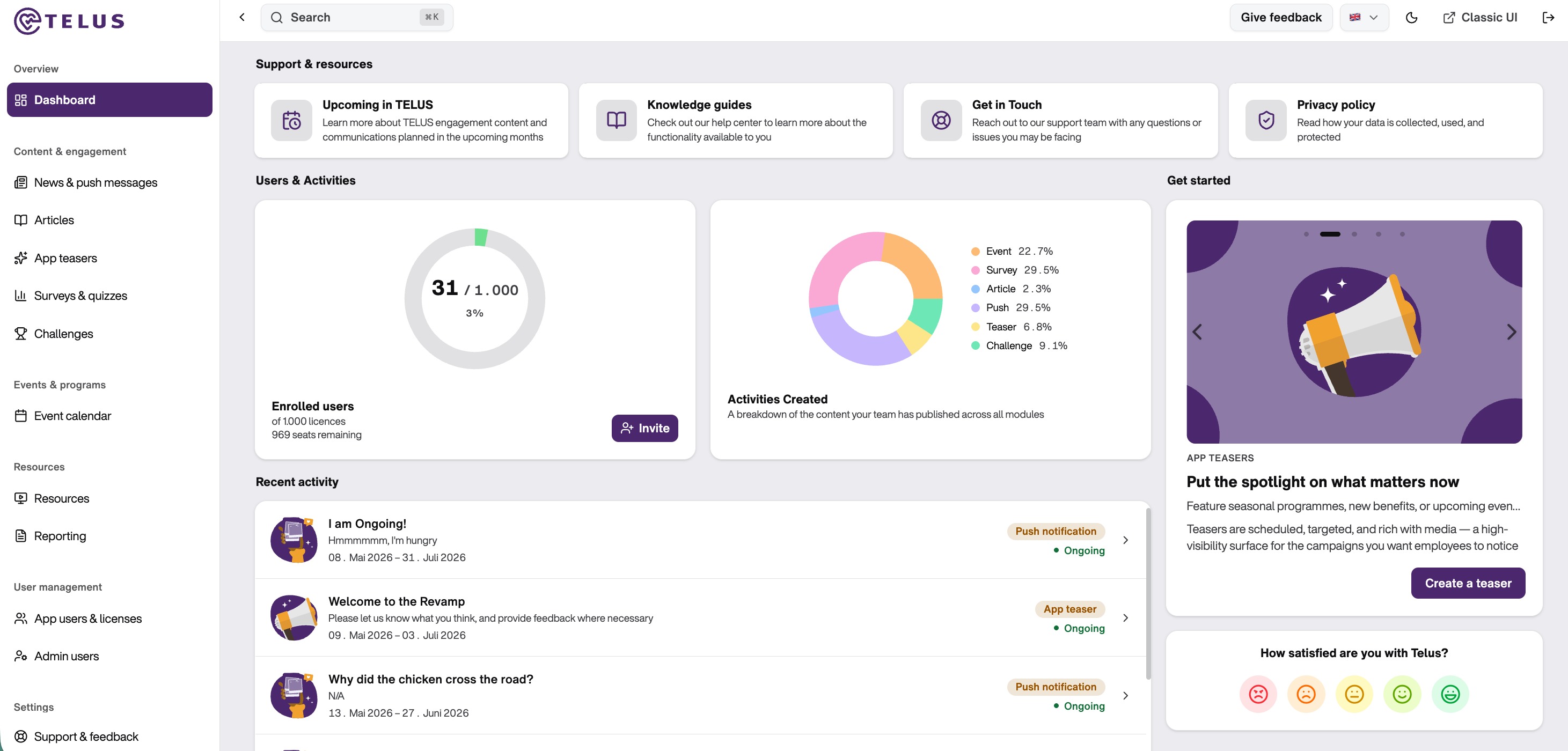
The Dashboard is your main entry point when you log into TELUS. It serves as a central hub where you can monitor key metrics, access resources, and get started with new initiatives. From this single page, you have a comprehensive view of your user engagement and can quickly navigate to the actions that matter most for your organization.
What You'll Find on Your Dashboard
The Dashboard is organized into several sections that give you everything you need at a glance. At the top, you'll find Support Resources and helpful information to get started with TELUS. Below that, you'll see important metrics about your users and the activities your team has created. On the right side, there are actionable suggestions and feedback options to help you move forward with your engagement strategy.
The layout is designed to be intuitive, with key information prominently displayed so you don't have to dig through multiple pages to understand how your organization is performing on the platform. Whether you're checking on user adoption, reviewing your content output, or looking for help, the Dashboard makes it easy to access what you need.
Accessing Support and Resources
The Dashboard features quick links to essential support materials: access comprehensive knowledge guides to learn about functionality, stay informed about upcoming TELUS features, reach out to the support team with any questions, and review our privacy policy. These resources are readily available so you can get answers quickly and stay informed about new capabilities coming to the platform.
Monitoring Your Progress
The "Users & Activities" section displays your current enrollment numbers and provides insight into how your team is using the platform. You can see at a glance how many licenses you've activated out of your total allocation, how many seats remain available, and a breakdown of the content types your team has created. This quick overview helps you understand adoption rates and content distribution without requiring a deep dive into detailed reports.
Getting Started
The "Get Started" section is designed to help you quickly create and launch engagement initiatives.
Use the carousel to explore available content and engagement actions, such as creating events, launching surveys, setting up challenges, sending push notifications, or publishing teasers. Each option includes a dedicated call-to-action (CTA) button, allowing you to start building your campaign with just a few clicks.This streamlined workflow allows you to create and manage engagement activities quickly and effectively.
Staying Informed with Recent Activity
The "Recent Activity" section keeps you updated on current and ongoing campaigns at a glance. From ongoing challenges and surveys to upcoming events and app teasers, you can see what's live, what's scheduled, and when activities run. This timeline helps you track your engagement strategy's momentum and ensure nothing falls through the cracks.
Additional Features
From the start page, you can change your language settings and submit your feedback directly. We value your input and use it to continuously improve the TELUS platform.
Was this article helpful?
That’s Great!
Thank you for your feedback
Sorry! We couldn't be helpful
Thank you for your feedback
Feedback sent
We appreciate your effort and will try to fix the article